Claude Code, Cursor & Codex: 11 Rules for 70% Faster Development
Discover the 11-step methodology that transforms AI coding chaos into consistent, professional results — from a developer with 10+ years of enterprise experience building systems across 8 countries

I’m Alek, writing this from my workspace in the Apulian countryside, where I live surrounded by olive trees with my two 🦮🦮 flat-coated retrievers who are currently sprawled across the floor as my faithful writing companions. They’ve learned that when I pull out my laptop for article writing, it’s naptime — though they still perk up whenever Claude Code suggests something particularly clever.
I’m a Product Manager at C&C (an Apple Premium Partner across 8 European countries), where I build internal tools for retail, education, and B2B teams. I work daily with Vue, Nuxt, Supabase, and n8n, mostly using AI-assisted coding through Cursor and now Claude Code.
After building enterprise software for over 10 years and recently developing our ERP system entirely through what I call “vibe coding” with AI agents, I’ve learned something that completely changed my development process:
coding agents don’t fail at coding. We fail at instructing.
The developer paradox: You can build complex systems managing millions of transactions, but watch a simple Nuxt composable request turn into a three-hour debugging nightmare with AI. The difference isn’t in the complexity — it’s in the communication.
This isn’t just theory. Sometimes I hear developers complaining: “Claude Code is terrible, OpenAI is much better”, “No, Cursor is useless, it doesn’t understand anything”, or even worse “Windsurf doesn’t get it, better stick with Codex” — and I’m genuinely baffled because the real problem isn’t the tool, it’s how we ask questions and the context we provide. I remember achieving incredible results even last year with Sonnet 3.5.
The moment developers switch from blaming the tool to improving their instruction technique, everything changes. The same techniques that helped us deliver our automation module 70% faster than traditional development.
What You’ll Learn Today
In this article, you’ll discover:
• How to transform AI agent failures into consistent wins using molecular-level instruction techniques
• The complete 11-step methodology that reduced our enterprise development time by 70%
• Documentation systems that give AI agents persistent memory across development sessions
• Screenshot-driven development using tools like Xnapper for visual communication
• The “vibe coding” workflow: from enterprise chaos to structured AI partnerships
• Real examples from enterprise development across multiple markets
• MCP tool selection strategy that maximizes productivity without complexity
• Component naming conventions that make AI agents instantly productive
• 5 hard-won lessons from over a year of enterprise AI-assisted development
• Ready-to-use prompts and templates you can implement immediately
Strategic Foundation: The Molecular Instruction Principle
In my experience with enterprise software, the biggest challenge with AI coding agents isn’t technical complexity — it’s invisible context syndrome. After building systems for multinationals, you expect AI to understand your complex requirements like your senior developers do.
Here’s the hard truth: AI agents are brilliant executors but terrible interpreters.
The “Build a House” Problem I Actually Faced
A few months ago. A day that lives in my development horror stories.
I was deep in our ERP development, feeling confident after months of successful AI collaboration. The retail module was ahead of schedule, and I got cocky. I handed Claude a 200-line specification and asked it to “build the entire user management system.”
The result? A beautiful disaster. Components that looked professional individually but worked together like strangers at a party. Authentication flows that broke under edge cases. Database queries that worked perfectly — for exactly one user at a time.
I had fallen into the AI instruction trap: treating brilliant executors like mind readers.
That failure taught me the fundamental truth that transformed our development process: AI agents don’t fail at coding. We fail at providing molecular-level specificity.
💡 Key Insight: “AI thrives on molecular-level specificity, not abstract concepts. The art is breaking down human vision into atomic, executable components.”
The Molecular Mindset Revolution
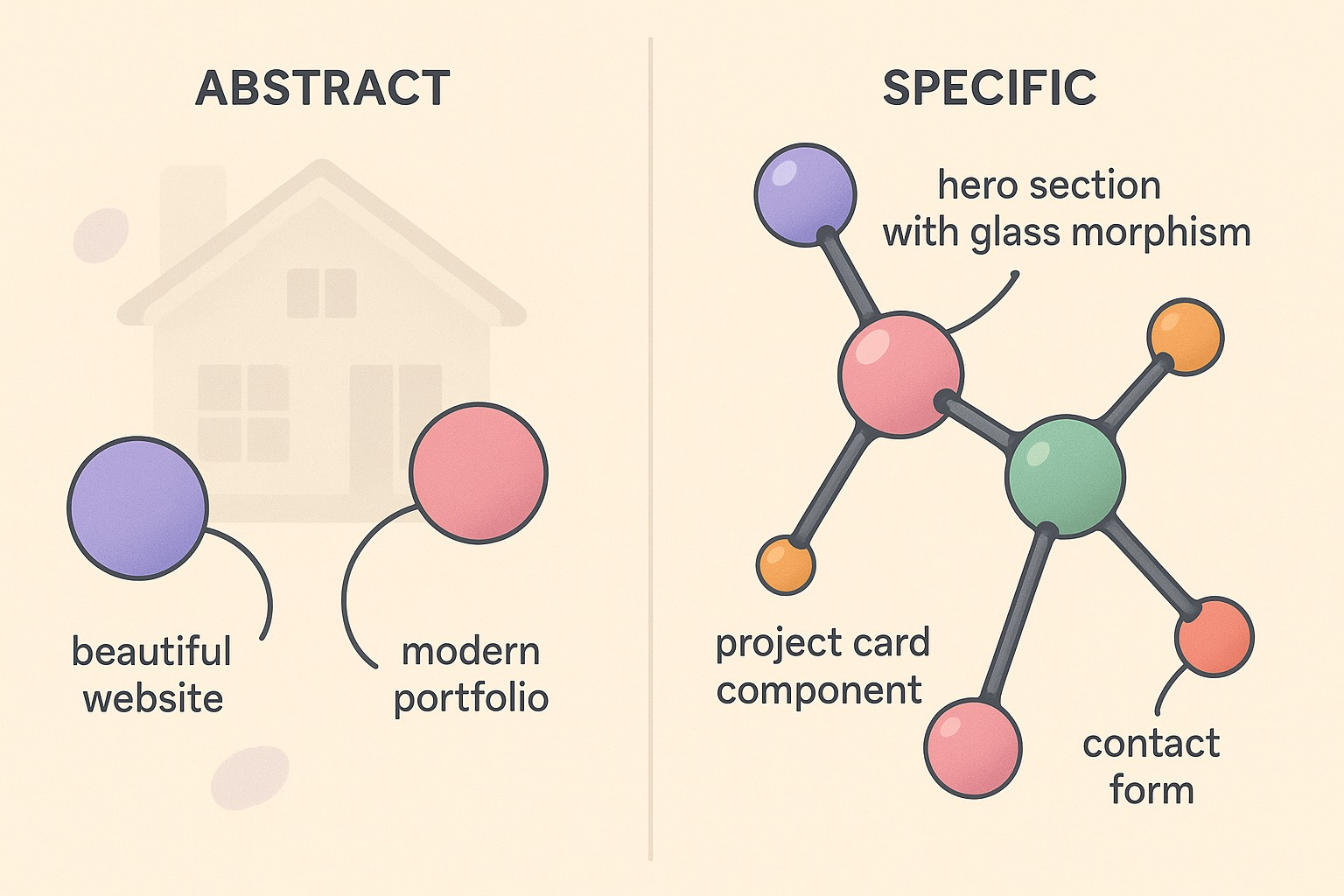
Think of your project like a molecule: instead of describing the entire structure, break it down into atomic components with specific properties and relationships.
Traditional approach (what doesn’t work):
“Build a user management system for our multinational ERP”
Molecular approach (what transforms everything):
“Create a UserCard component with avatar (48x48px), name (Inter font, 16px bold), role badge (gray-100 background), and online status indicator (green dot, 8px)”
“Build a UserPermissionToggle using Radix Switch, showing current state, with optimistic updates and error rollback”
“Implement a CountryFilter dropdown with flag icons, using our existing Select component from components/ui/”
Why this changes everything for enterprise development:
AI understands exactly what you want (no guessing games with business requirements)
Results are immediately usable (less debugging time, more shipping time)
Quality stays consistently high (specific requirements = specific solutions)
Documentation writes itself (detailed inputs create detailed outputs)
Team velocity increases (other developers can follow the same patterns)
This principle became the foundation for every AI interaction in our development process. Each request operates at the molecular level, creating precise, interconnected components that form enterprise-grade solutions.
According to GitHub’s 2025 State of AI in Software Development report, developers using structured prompting methodologies are 55% more productive than those who don’t. In my experience, the productivity gap is even wider — we’re seeing 70–80% improvements in development velocity.
Professional AI Development Methodology: The 11-Step System That Delivers
Through years of enterprise development, I’ve crystallized a systematic approach that consistently delivers production-grade results. This isn’t theory — it’s battle-tested methodology refined through real projects.
The beautiful thing about these techniques? They work across all AI coding assistants. Whether you’re team Claude Code (like me and my sleepy retrievers), riding the Cursor wave, or experimenting with OpenAI’s Codex, these principles translate perfectly. Each agent has its quirks — Claude Code loves detailed context, Cursor excels at codebase understanding, Codex thinks in pure logic — but they all respond brilliantly to the same foundational approach.
Pro tip: The agent doesn’t matter as much as your instruction quality. I’ve seen developers blame their tools when the real problem was asking for miracles instead of molecules.
1. 📋 PRD First: Create Your AI Blueprint (The Foundation That Changes Everything)
The hard truth about new projects: Starting without a PRD is like giving your GPS a destination of “somewhere nice.” You’ll end up lost, frustrated, and blaming the navigation system.
My personal PRD workflow (refined over countless projects):
Open Claude Desktop with web search enabled
Research phase: “Analyze current market trends for [project type], identify key features, suggest technical architecture options for 2025”
Let Claude research and present options (this is where the magic happens — AI research is comprehensive and unbiased)
Refine the vision through conversation until it’s crystal clear
Generate the PRD: “Create a detailed Product Requirements Document for this project”
Save as markdown in your project folder:
/docs/PRD.mdImport to Obsidian for linking and future reference
Add to CLAUDE.md:
Reference /docs/PRD.md for all project context
Why this workflow transforms AI development:
AI agents become instantly context-aware of your project
No more explaining the same requirements 50 times
Every coding session starts with perfect context
Your future self (and teammates) will thank you
The PRD template that works:
# Project Name - Product Requirements Document
Generated: [Date] | Updated: [Date]

## Vision Statement
[One clear sentence: What are we building and why?]
## Business Context
- Target users and their pain points
- Market opportunity and constraints
- Success metrics and timelines
## Technical Architecture
- Recommended tech stack (AI-suggested options)
- Database schema requirements
- Third-party integrations needed
- Performance and security requirements
## Feature Breakdown (Atomic Level)
### Core Features
- [Feature 1]: Broken into specific components
- [Feature 2]: With clear acceptance criteria
- [Feature 3]: Including edge cases and error states
### Nice-to-Have Features
- [Future enhancements with priorities]
## Development Phases
- Phase 1: MVP components
- Phase 2: Enhanced functionality
- Phase 3: Advanced features
## Questions to Resolve
- [Decisions pending research or stakeholder input]
Real example: Before building our latest retail module, I spent 20 minutes in Claude Desktop researching European e-commerce regulations, technical architecture options, and competitive features. The resulting PRD saved weeks of back-and-forth during development.
How to use this with any AI agent:
Claude Code: Reference the PRD file in every conversation
Cursor: Add PRD path to your workspace for context awareness
Codex: Include PRD sections in your prompts for consistent logic
💡 Pro Tip: “A PRD isn’t bureaucracy — it’s your AI agent’s long-term memory and your project’s North Star. Five minutes of planning prevents five hours of confused coding sessions.”
Pro tip: PRD writing sessions are perfect for getting into the right mindset. You’re not just coding — you’re architecting the future conversation between you and your AI agent.
2. 🧩 Master Atomic Component Thinking (The Art of Not Asking for Miracles)
The Enterprise Reality: You can’t build complex systems by asking for complex things. This is where most developers go wrong, and where AI agents silently weep.
The miracle request that fails every time: “Build a user dashboard with analytics, notifications, user management, real-time updates, and make it look modern.”
What your AI agent hears: “Please read my mind, guess my design preferences, assume my data structure, and somehow know exactly how I want everything to work together.” It’s like asking someone to cook your favorite meal without telling them what you like to eat.
The atomic approach that actually works:
Create a single UserCard component that:
- Displays user avatar (48x48px, rounded-full, with loading skeleton)
- Shows name (Inter font, 16px font-semibold, text-gray-900)
- Includes role badge (text-xs, px-2 py-1, bg-blue-100, text-blue-800)
- Has online status indicator (8px dot, green-500 if online, gray-300 if offline)
- Uses TypeScript with proper interface definitions
How to delegate to your AI agent:
Claude Code: “Help me break down this feature into atomic components. List each component with specific properties.”
Cursor: “Analyze this feature requirement and suggest the smallest buildable pieces.”
Codex: “Decompose: [feature description] → atomic components with clear interfaces.”
Real example: When building our inventory system, I didn’t start with “build an inventory dashboard” (learned that lesson the hard way). I started with a single ProductRow component. Then ProductTable. Then InventoryDashboard. Each conversation took 2–3 minutes and produced immediately usable, professional components.
The productivity breakthrough: This approach helped us deliver our entire product catalog interface — handling thousands of SKUs across multiple languages — in two days instead of two weeks.
Ask your agent for help with decomposition: “I need to build [complex feature]. Help me identify the atomic components and their relationships.” Every AI agent excels at this kind of analytical breakdown.
💡 Key Insight: “Complex systems emerge from simple components, never from complex instructions. Master the art of decomposition, master AI development.”
3. 📁 Context Architecture: The File Citation System (Teaching AI Your Codebase Language)
The Enterprise Truth: AI agents have photographic memory for syntax but complete amnesia for your project context.
This is like hiring a brilliant developer who knows every programming language perfectly but has never seen your codebase. You wouldn’t just say “make it consistent with our style” — you’d show them examples.
The lazy developer approach (guilty as charged): “Create a button component that matches our design system.”
What your AI agent thinks: “Which design system? What colors? What sizes? What hover states? Should I guess wildly and hope for the best?”
The context-driven approach that works:
Looking at components/ui/Button.vue and stores/auth.js, create a LogoutButton component that:
- Uses the same styling patterns as Button.vue (size variants, color schemes)
- Follows our established TypeScript interfaces from types/auth.ts
- Calls the logout method from auth store with proper error handling
- Shows loading state using our LoadingSpinner component
- Includes proper ARIA labels for accessibility (WCAG 2.1)
- Handles edge case: network failures during logout
How to get AI agents to analyze your context:
Claude Code: “Analyze these 3 files [file paths] and suggest consistent patterns for my new component”
Cursor: “Review my existing auth components and generate a similar logout flow”
Codex: “Study [specific files] and maintain the same architectural patterns in new code”
The breakthrough moment: During the summer, our team needed a custom authentication flow. Instead of describing what I wanted from scratch, I referenced our existing implementation. Claude Code understood immediately and adapted the patterns perfectly — including the specific error handling we’d refined over months.
Measurable results: This context-driven approach reduced my debugging time by 80% and eliminated the “component mismatch” issues that used to plague our codebase.
Starting every request with “Looking at components…” has become my signal for productive AI sessions. It’s the coding equivalent of “Based on our conversation so far…”
💡 Pro Tip: “Context is king in AI development. Always reference existing files so AI agents can match your coding style, naming conventions, and architectural patterns. Your codebase becomes their teacher.”
4. 🏷️ The Art of Self-Documenting Component Names (Because Future You Has Amnesia)
The Enterprise Truth: Component names are your first line of defense against codebase chaos.
Here’s the thing about AI agents — they’re literal creatures. When Claude Code sees UserProfileEditModal, it immediately understands this is a modal for editing user profiles, not viewing them. When Cursor encounters InvoiceGenerationWizardMultiCountry, it knows we’re dealing with complex international invoice logic, not a simple form.
But human developers? We name things like Modal, UserThing, Helper, and Manager then wonder why our codebase feels like a mystery novel.
What doesn’t work (and drives AI agents to digital tears):
“Create a modal for user stuff”
“Build a dashboard component”
“Make a helper for data things”
What transforms productivity:
“Create a UserProfileEditModal component with save and cancel buttons, form validation, and loading states”
“Build a RetailInventoryDashboardResponsive component that works on manager tablets”
“Make a EuropeanVatCalculationHelper for multi-country tax logic”
Real naming convention from our ERP:
InvoiceGenerationWizardMultiCountry(handles VAT differences across countries—the name tells the whole story)ClientContactSelectorWithTimezone(accounts for European business hours—no guessing needed)OrderStatusBadgeLocalized(displays status in local language—self-explanatory)RetailInventoryDashboardResponsive(works on manager tablets and staff phones—context is clear)
How to get AI help with naming:
Claude Code: “Suggest descriptive component names for [functionality]. Include the main purpose and key features in the name.”
Cursor: “Analyze this component’s function and suggest a self-documenting name”
Codex: “Generate component names that immediately communicate purpose and scope”
The six-month test: When I return to our codebase after working on other projects, I can navigate the entire system without remembering what anything does. The names tell the story. Even a junior developer can immediately understand what ClientContactSelectorWithTimezone does.
Pro tip for AI agents: Descriptive names create a positive feedback loop. Better names lead to better component suggestions, which lead to better architecture discussions, which lead to better code.
💡 Key Insight: “Self-documenting code starts with self-documenting names. When your component names tell a story, your AI agents become better storytellers.”
5. 📚 The AI Memory Extension System (Because Amnesia Isn’t a Feature)
The brutal reality: AI agents have perfect syntax memory but couldn’t remember your project if their digital life depended on it.
It’s like working with a brilliant developer who gets complete amnesia between every conversation. “What was our authentication strategy again?” “Which components did we build yesterday?” “Why did we choose this approach?”
My proven documentation architecture (learned through many forgetful AI sessions):
/docs/
├── COMPONENTS.md          # Component catalog with usage examples
├── MILESTONES.md         # Development history and lessons learned
├── ARCHITECTURE.md       # How everything connects and why
├── DECISIONS.md          # Technical choices and their rationale
├── PATTERNS.md           # Reusable code patterns and conventions
└── TROUBLESHOOTING.md    # Common issues and solutions
How to get AI agents to help maintain documentation:
Claude Code: “Review this conversation and update our COMPONENTS.md with what we built”
Cursor: “Generate documentation for these new components following our established format”
Codex: “Analyze this code and suggest additions to our PATTERNS.md file”
Real example from our team expansion:
# DECISIONS.md - ERP v2.1

## Authentication Architecture (Nov 2025)
**Decision**: JWT tokens with Supabase Auth
**Reasoning**: GDPR compliance, multi-country session management
**Lessons Learned**: Refresh token rotation critical for 8-hour retail shifts
**Next Developer**: Reference this for any auth-related components
**AI Agent Note**: Always ask about session management before suggesting auth changes
The productivity multiplier: When I share these docs with any AI agent before starting new features, it’s like having a senior developer with perfect memory join the conversation.
Real impact: Our new team members become productive in 2 days instead of 2 weeks because AI agents can reference our complete decision history. The consistency is genuinely impressive.
AI agents love updating documentation. Ask them: “Add this decision to our DECISIONS.md” or “Update TROUBLESHOOTING.md with this solution.”
💡 Pro Tip: “AI agents have no memory between sessions. Your documentation system becomes their persistent knowledge base — and your team’s institutional memory. Documentation is cheaper than re-explaining everything to brilliant amnesiacs.”
6. Smart MCP Usage Without Tool Overload
Model Context Protocol (MCP) tools are powerful, but I’ve learned to be selective. My essential MCP toolkit for development:
Supabase MCP: Direct database interactions
File System MCP: Project navigation and file management
Git MCP: Version control integration
Context 7
API Testing MCP: Endpoint validation
I avoid the temptation to install every available MCP tool. Five well-chosen tools beat 50 scattered ones.
7. The Lovable-to-Local Workflow (For Coding Beginners Only)
Full disclosure: I don’t use Lovable, Replit, or v0 anymore. But if you’re new to coding and the thought of terminals or IDEs makes you break out in cold sweats, these tools can be your training wheels.
The beginner-friendly approach:
Start with browser-based tools (if IDEs scare you):
Lovable/v0: AI-powered UI building
Replit: Code in the browser
Bolt.new: Instant development
2. The non-negotiable rule: Download your code IMMEDIATELY
Never, ever depend on these systems long-term
Export everything to your local machine
Own your code, don’t rent it
3. Graduate to local development:
Cursor: AI-powered local IDE
Claude Code: AI assistant with your files
Cline: Terminal-based AI coding
Codex: OpenAI’s coding assistant
Trae: Another chip tool
Why this matters: Cloud-based coding platforms are convenient but dangerous. What happens when they change pricing? When they go down? When they decide to shut down? Your code needs to live on your blessed computer, not in someone else’s cloud.
My recommendation: Use browser tools only to overcome the initial fear, then move everything local as fast as possible. The goal is independence, not dependency.
How to get AI help with local development:
Claude Code: “Help me set up this project locally with proper folder structure”
Cursor: “Convert this browser-based code to a local development environment”
Cline: “Guide me through setting up version control for this project”
💡 Pro Tip: “Browser coding tools are like training wheels — useful for learning balance, but you don’t want to ride your whole life with them. The real power comes when your code lives on your machine.”
8. UI Library Strategy for Consistency
One of my best decisions was standardizing on UI libraries early. For our projects, I use:
ShadCn: Unstyled, accessible components
Radix UI: Unstyled, accessible components
Tailwind CSS: Utility-first styling
Headless UI: Vue-specific components
Vue Use: Composition utilities
Intent Ui
Naive UI
Every AI agent conversation starts with: “Use Radix UI components and Tailwind classes, following our established design system.”
This consistency means I can hand off any component to any developer (or AI agent) and get predictable results.
💡 Key Concept: Standardize your UI library stack before building. It’s easier to train AI agents on consistent patterns than to refactor inconsistent code later.
Use this to ensure all generated components follow the same design language
9. Screenshot-Driven Development with Annotations
This technique has revolutionized how I communicate visual requirements to AI agents. I use Xnapper (or similar tools) to create annotated screenshots showing exactly what I want.
My annotation process:
Take screenshot of existing UI or mockup or Tables structure (when I work on supabase)
Add arrows pointing to specific elements
Include text descriptions of desired changes
Attach to Claude Code with specific instructions
For our dashboard redesign, I annotated a screenshot showing “Move this chart here, change this button color to green, add a loading state here.” The AI agent understood immediately and implemented it perfectly.
10. 🎯 Train Your AI Agents: They Learn From Your Feedback
The game-changer: AI agents aren’t static tools — they’re learnable partners that improve with your guidance.
Most developers treat AI agents like fixed software, but here’s what I’ve discovered: they evolve with your specific needs when you give them targeted feedback.
Cursor recently launched Cursor Agents which takes this concept even further, and I’ve been experimenting with training different agents for specific tasks. But what I find particularly fantastic is Claude Code’s subagents — you can create them directly through the CLI interface, which gives you incredible flexibility.
Real example from my workflow: I had an agent that kept creating Tailwind classes instead of using inline CSS, even though I prefer inline utilities for rapid development. After the third time correcting it, I said: “@agent, please instruct this agent to always use inline Tailwind utilities instead of creating custom CSS classes. This is a persistent preference for this project.” From that point on, it consistently generated inline styles.
Another practical example: When an agent kept generating overly complex component structures, I trained it: “@agent, update your instructions to create atomic components with maximum 100 lines each, following our existing patterns in components/ui/.” The difference was immediate and lasting.
The beauty of Claude Code’s subagents approach is the direct CLI control — you can spawn specialized agents for different parts of your codebase and configure them on the fly without leaving your terminal workflow.
AI agents remember your feedback within conversations but forget between sessions. Document your successful instruction patterns and reuse them.
💡 Key Insight: “AI agents are customizable partners, not fixed tools. The effort you invest in training them pays dividends across every future interaction. Your instructions become their personality.”
11. 🔄 Use /clear and Start Fresh (The Secret to Consistent Performance)
The most underrated productivity hack: Nothing beats starting a new conversation when your task is complete.
After months of AI-assisted development, I’ve learned that conversation length directly impacts AI performance. The longer the chat, the more the context gets muddled, the slower the responses become, and the more likely you are to get inconsistent results.
My hard-learned rule: Use /clear or start a new chat religiously.
When to clear the conversation:
After completing a feature: Don’t drag old context into new work
When switching project areas: Moving from frontend to backend? New chat.
When performance degrades: If responses get slow or weird, it’s time to refresh
After major debugging sessions: Long troubleshooting conversations create noise
Tool-specific approaches:
Claude Code:
/clearcommand when available, or start new conversationCursor: Close and reopen chat panel for complex tasks
Codex: New session for each major feature
Long tasks: Use
/compactif your tool supports it to compress context
Real example: I was debugging a complex Supabase integration that took 200+ messages. When I finally solved it, instead of continuing to the next feature, I used /clear and started fresh with: “I have a working Supabase auth system. Now I need to build a user dashboard component.” The difference in response speed and quality was night and day.
Why this works:
Cleaner context: No irrelevant conversation history
Faster responses: Less context to process means quicker AI thinking
Better focus: AI agents work better with focused, specific contexts
Reduced confusion: Eliminates contradictory information from previous discussions
The psychological benefit: Starting fresh also resets your own mental state. You approach the new task with cleaner thinking and better-structured requests.
💡 Pro Tip: “Treat each AI conversation like a focused work session. When the session ends, clear the slate. Your future self will thank you for the clean, fast interactions.”
My personal actual choice
I primarily use Claude Code because I love working with Opus and Sonnet models directly. The hooks, terminal commands, and subagents system feels incredibly mature and well-thought-out. I also appreciate being able to work directly with the company that develops the LLM rather than through an intermediary layer.
That said, I’m watching OpenAI’s Codex CLI with great interest — I believe it has the most promising future trajectory.
Cursor is beautifully crafted and the team does amazing work, but it adds an extra layer and cost on top of the underlying models. While I prefer working directly with Anthropic now, I’m concerned about their cost structure and potential price increases ahead. OpenAI’s approach with Codex feels more sustainable long-term.
But for the present moment? Claude Code remains my daily driver. The combination of model quality, development experience, and direct access to cutting-edge AI research makes it hard to beat.
I Used Claude Code for 30 Days: 7 Practical Discoveries (Still Learning)
Let me be upfront: 30 days isn’t enough time to master any development tool, and I’m definitely still learning Claude…
Real-World Results: Enterprise Development Success
Let me share specific results from building our ERP using these techniques:
Development Speed: What traditionally took our team 3 months per module now takes 3–4 weeks
Code Quality: 90% fewer bugs in initial releases compared to manually coded features
Team Onboarding: New developers become productive in days instead of weeks
Maintenance: AI-generated components are easier to modify because they follow consistent patterns
Our retail automation module, which handles operations across 8 European countries, was built 70% faster than our previous manual development approach. The AI agents handled the repetitive component creation while I focused on business logic and user experience.
Have you experienced similar productivity gains in your projects? Let me know in the comments.
The Mindset Shift That Makes Everything Work
The biggest change isn’t technical — it’s mental. I stopped thinking of AI agents as tools and started treating them as junior developers who are incredibly skilled but need clear guidance.
When I’m “vibe coding” with Claude Code, I imagine I’m pair programming with someone who:
Has perfect memory of syntax but no context about our project
Can implement anything but needs exact specifications
Works incredibly fast but requires clear communication
Never gets tired but can get confused by ambiguous instructions
This mindset shift transformed my development process. Instead of getting frustrated when AI agents don’t read my mind, I’ve become better at articulating exactly what I want.
💡 Key Concept: Treat AI coding agents like brilliant but context-free pair programming partners. Your job is to provide the context and clarity they need to excel.
Use this mindset shift to improve all your AI agent interactions
The Hidden Productivity Multipliers
Beyond the core methodology, I’ve discovered several “multiplier” techniques that dramatically amplify results:
Error-Driven Learning
When Claude Code produces unexpected results, I don’t just fix it — I analyze why the instruction failed and refine my prompting technique. Each failure makes my next instruction better.
Component Versioning
I ask AI agents to create multiple versions of components (simple, advanced, enterprise) then choose the best one. This technique helped me discover the optimal complexity level for our user interfaces.
Cross-Platform Consistency
When building for multiple devices, I provide mobile and desktop screenshots simultaneously. AI agents excel at creating responsive designs when they can see both target layouts.
Business Logic Separation
I’ve learned to separate business logic from UI components in my instructions. This makes components more reusable and easier for AI agents to understand.
5 Hard-Won Lessons From Over a Year of Enterprise AI Development
These aren’t theoretical insights — they’re expensive lessons learned through real enterprise development. Each lesson cost me time, frustration, or both before I figured it out.
1. 📝 Living Documentation Beats Perfect Planning
The midnight revelation: Late one evening, around 2:30 AM.
I’d been trying to maintain perfect architectural documents, spending hours creating comprehensive specs that became outdated the moment we changed anything. My coffee was cold, my documentation was stale, and Claude Code kept asking me to clarify decisions we’d made weeks ago.
Then it hit me: I was doing documentation when I should have been doing knowledge management.
Instead of trying to document everything perfectly upfront, I started creating living documents that evolved with our codebase. AI agents could contribute to the documentation, and documentation could guide AI agents.
💡 Key Insight: “The best documentation grows with your code, not ahead of it. When your tools think alongside you, knowledge becomes a byproduct of creation.”
2. 🧪 AI Agents Amplify Your Architecture, Good or Bad
The painful truth: AI agents don’t fix bad architectural decisions — they multiply them at incredible speed.
If your component structure is messy, AI will create more messy components. If your naming conventions are unclear, AI will perpetuate the confusion. If your data flow is convoluted, AI will build more convoluted connections.
The breakthrough: Focus on getting your foundation right first. One well-architected component becomes the template for dozens of AI-generated ones.
3. 🎯 Screenshot-Driven Development Changes Everything
The creative breakthrough: For 10+ years, I struggled with visual communication. I could architect complex enterprise systems but couldn’t clearly communicate what I wanted interfaces to look like.
Screenshot-driven development with tools like Xnapper transformed this weakness into a strength. Now I collect visual inspiration, annotate what I want, and let AI agents translate vision into code.
The systematic approach:
Gather inspiration from Mobbin.com, Dribbble, or existing successful apps
Create annotated screenshots showing exactly what you want
Upload to Claude Code with specific implementation instructions
Iterate based on results, building a visual vocabulary
4. 🔄 Version Control Is Your AI Safety Net
A few months back: A day that lives in my personal developer history.
I was deep in a vibe coding session with Claude Code, building a complex data visualization for our analytics dashboard. Everything was flowing perfectly — components being created, integrations falling into place, magic happening.
Then Claude Code suggested a “quick refactor” of the entire component architecture. I said yes without thinking. Thirty minutes later, I realized we’d completely broken the authentication integration, and I had no way back.
I had no commits. No breadcrumbs. No safety net.
Now my workflow is religiously simple:
Working feature? Commit immediately.
Claude Code suggests changes? Commit first, then experiment.
End of session? Commit with descriptive message.
5. 🌍 Enterprise Context Must Be Explicit
Working across 8 European countries taught me that context isn’t optional — it’s architectural. Every timezone difference, every GDPR requirement, every cultural nuance needs to be explicit in your AI instructions.
Bad: “Create a contact form”
Good: “Create a GDPR-compliant contact form with proper data processing consent for European markets”
AI agents can handle complexity, but only if you make the requirements explicit.
Questions for Reflection
🤔 What’s your biggest frustration with AI coding agents right now?
🤔 How could you apply the molecular instruction principle to your current project?
🤔 What documentation system would give your AI agents the context they need?
🤔 Which of these 10 steps would have the biggest impact on your development workflow?
Next Steps for You
Ready to transform your AI development workflow? Here’s your action plan:
Start with atomic thinking: Choose one complex feature and break it into molecular components
Create your documentation system: Set up COMPONENTS.md, DECISIONS.md, and PATTERNS.md files
Practice context-driven prompts: Always reference existing files in your AI requests
Implement screenshot-driven development: Use visual references for your next UI component
Establish your commit discipline: Version control becomes your confidence foundation
Choose your AI agent stack: Experiment with Claude Code, Cursor, or Cline based on your needs
The most important step: Don’t wait for perfect methodology. Start with one technique today and build from there.
What You’ve Learned
You now know how to:
• Transform AI coding frustrations into productive partnerships through better instruction techniques
• Implement the 10-step methodology that consistently delivers clean, maintainable code
• Create documentation systems that give AI agents the context they need to excel
• Use screenshot annotations and UI libraries to communicate visual requirements clearly
The next time you’re building a feature with AI assistance, you’ll be ready to get professional results in a fraction of the time.
This approach has transformed how I build enterprise software. Our ERP, which serves operations across multiple European countries, was built primarily through AI-assisted development using these exact techniques. The productivity gains are real, measurable, and repeatable.
Professional Contact and Collaboration
Let’s connect professionally:
💼 LinkedIn: linkedin.com/in/alekdobrohotov — Enterprise AI development insights
🌐 Portfolio: alekdob.com — Live implementation examples from enterprise development
📧 Professional contact: gmail@alekdob.com
About my email choice: I’ve used gmail@alekdob.com for over 10 years — since 2014 when I registered the domain. What started as a creative branding decision has become my signature in enterprise discussions across 8 European countries. It’s memorable, professional, and always starts conversations about innovative thinking.
For ongoing enterprise AI insights:
📬 Follow on Medium for detailed case studies from enterprise development
🐦 X @alekdob for daily updates on Product Management and AI development
Found this helpful? There’s more where this came from. Check out my other articles on enterprise AI integration and vibe coding methodology.
👉 Follow me on Medium and Substack for weekly insights on building enterprise software with AI assistance.
💬 Drop a comment below — I read and respond to every one. What’s your biggest challenge with AI coding agents? Are you dealing with inconsistent code quality, unclear requirements communication, or something else entirely?
🌐 Want to see more of my work? Visit alekdob.com for detailed case studies and project breakdowns from our 8-country European deployment.
Clap if this helped you — it helps other enterprise developers find these insights! 👏
Thanks for the detailed methodology 👍🏽
The most important part, in my opinion, is guiding the AI and making sure it doesn’t go off track. If the task isn’t just boilerplate code, closely monitoring its output is always a good idea.
One more thing: I’ve experimented with approaches like BMAD and spec-kit (spec-driven development), but they didn’t work well for me. I’ve had the best results when I invest time upfront in building a strong context before starting the implementation.
Good rules of thumb. Add one more: write tests first so agents don’t drift into “almost right” land.